

Claude Computer Use and Dispatch: AI That Works While You're Away
Claude can now take full control of your computer, clicking, typing, and running apps on its own, while you send it tasks from your phone.
Anthropic just added two big new features to its AI assistant, Claude. On March 23, 2026, the company launched Claude Computer Use and Dispatch. Together, they let Claude take control of a Mac computer and complete tasks on its own. Users can send Claude instructions from their phone while the work gets done on their desktop.
Anthropic engineer Alex Albert shared his reaction on X, writing: "The future where I never have to open up my laptop to get work done is becoming real very fast."
"Claude can now point, click, and navigate like you would, doing everything from opening and editing files to handling complex software tasks. And with Dispatch, you can instruct Claude from your phone." Anthropic, Official Announcement, March 23, 2026
What Is Claude Computer Use?
Claude Computer Use lets the AI control a Mac computer the same way a person would. Claude can move the mouse, press keys, open apps, browse the web, manage files, and fill out spreadsheets. It does all of this on its own, without the user having to guide it step by step.
The feature works through two Anthropic tools. The first is Claude Cowork, which is made for everyday users. The second is Claude Code, which is made for software developers. Developers can use it to write and edit code, run tests, and submit changes to a project, all without sitting at their computer the whole time.
What Is Dispatch and Why Does It Matter?
Dispatch is the part of this update that works on your phone. It lets you send a task to Claude from your iPhone or Android device. Claude then gets to work on your desktop computer while you are away. You can check back later to see the finished result.
One important thing about Dispatch is that it keeps a single, ongoing conversation. Most AI chats start fresh every time you open them. Dispatch does not reset. It remembers the work from your last session, so you can pick up right where you left off, whether you are on your phone or back at your desk.
Full Mac Control
Claude moves the cursor, types on the keyboard, opens apps, and manages files on your Mac computer.
Dispatch from Phone
Send tasks to Claude from your iPhone or Android phone. Check back later when the work is done.
Smart App Connections
Claude tries to use connected apps like Google Calendar or Slack first. If those are not set up, it uses the screen instead.
Permission-First Design
Claude asks for permission before opening any new app. Users can stop it at any time.
How Does It Work?
Here is a simple example. Say you ask Claude to pull a report from Google Drive and email it to your team. Claude first checks if it has a connection set up for Google Drive and Gmail. If it does, it uses those connections to get the job done quickly.
If those connections are not set up, Claude does not give up. It opens the web browser on your computer, goes to Google Drive, finds the file, opens your email app, and sends the message. It handles the whole task on its own.
Before Claude does anything major, it sends you a notification so you know what is happening. You can also watch it work in real time or just come back when it is finished. For this to work, your computer must stay on and the Claude Desktop app must stay open.
"Rather than just being an AI chatbot, Claude can actually perform tasks and handle an entire workflow from start to finish on the user's behalf." BusinessToday, March 24, 2026
Who Can Use It and What Are the Limits?
Right now, Computer Use and Dispatch are available as a research preview. That means they are still being tested and improved. Only Claude Pro and Claude Max subscribers can access them. The features only work on Mac computers for now. People using Windows or Linux will have to wait for a future update.
To get started, you need to update both the Claude Desktop app and the Claude mobile app, then connect the two together. After that, you can start sending tasks from your phone.
| Detail | Status |
|---|---|
| Available on macOS | ✅ Yes |
| Available on Windows | ❌ Not yet |
| Available on Linux | ❌ Not yet |
| Works with Claude Pro | ✅ Yes |
| Works with Claude Max | ✅ Yes |
| Works with Claude Free | ❌ No |
| Dispatch mobile (iOS) | ✅ Yes |
| Dispatch mobile (Android) | ✅ Yes |
| Currently a research preview | ✅ Yes |
| Requires Desktop app + Mobile app pairing | ✅ Yes |
Is It Safe?
Anthropic is open about the risks. Because Claude can access files on your computer and use connected apps, it can make real changes to your data. That includes moving or deleting files. Anthropic warns users to understand what access they are giving Claude before letting it run on its own.
To help keep things safe, Anthropic built in a permission system. Claude must ask before it opens a new app. Users can stop Claude at any point. The company also built in scanning to detect if a website tries to secretly give Claude bad instructions.
Even so, Anthropic says this feature is still early. The company stated that "computer use is still early compared to Claude's ability to code or interact with text" and that some tasks may need more than one try to finish correctly.
How Does This Compare to Other AI Tools?
Other AI companies are working on similar features. OpenAI has its own computer control tools. Other AI agents like Perplexity Computer and Meta's Manus are also in this space. Open-source tools have also attracted large numbers of users, including reports of long lines at major tech companies to get the software installed.
Anthropic's approach is a bit different. Claude does its work directly on your own computer rather than sending your files to a remote server. This means your documents and data stay on your machine. Anthropic believes this will appeal to users and businesses that care about keeping their information private.
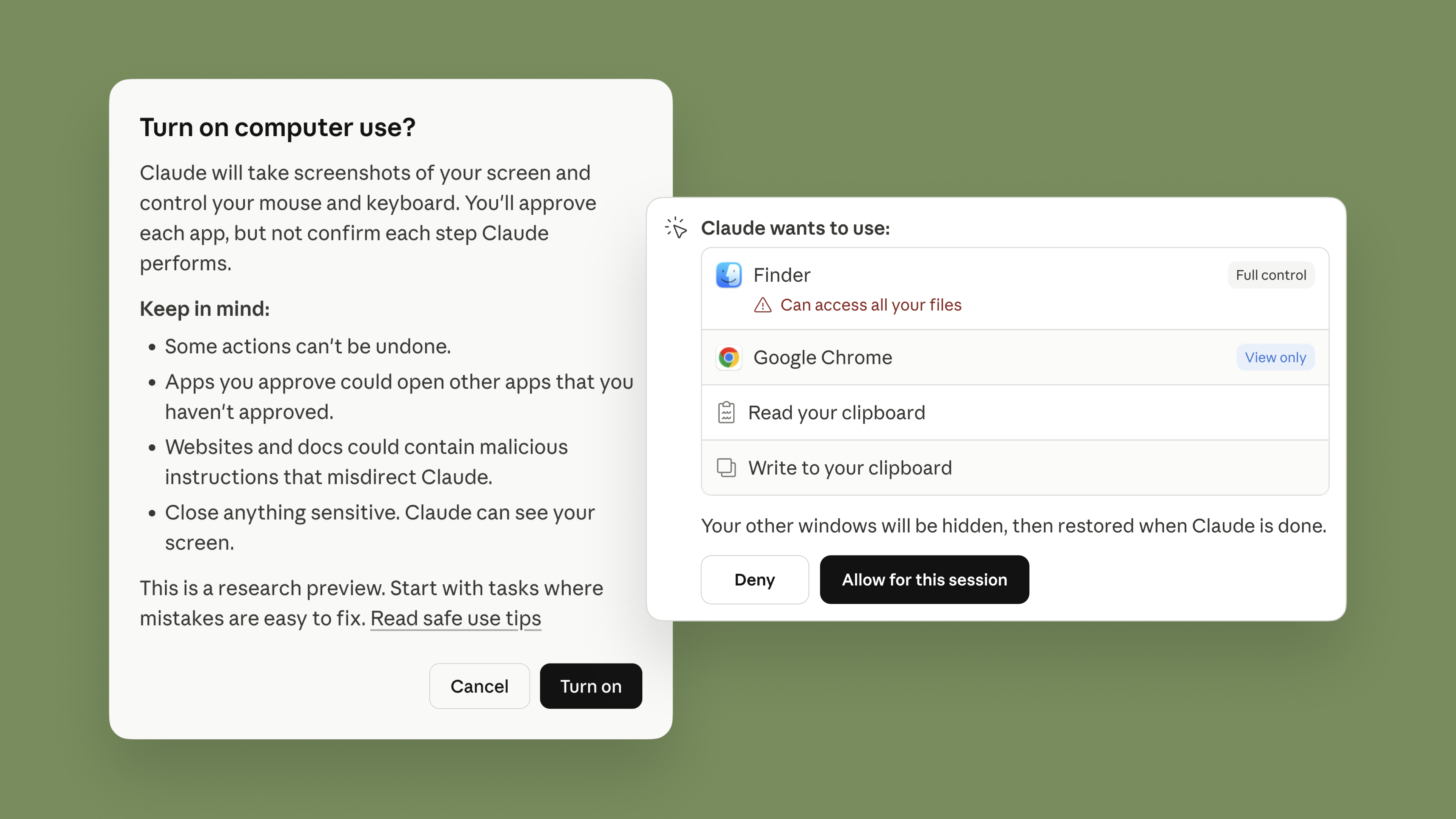 Claude will always request permission before accessing new applications. (Image Credit: Anthropic)
The Bottom Line
Claude can now do real computer work on your behalf. You send it a task from your phone, and it handles it on your Mac. This is a big step forward from an AI that only answers questions in a chat window.
The feature is still in testing, so it may not be perfect yet. But if you are a Claude Pro or Max subscriber on macOS, you can try it today by updating your apps and pairing your phone to your desktop.