

Which One Is Actually Worth Your Time?
Both tools let you run OpenClaw in the cloud without touching a server. But they are built for very different people and very different goals. Here is the honest breakdown.
- Both InstantlyClaw and KimiClaw let you run OpenClaw in the cloud with no servers, no terminal, and no technical setup. That part is the same.
- KimiClaw is built into the Kimi platform by Moonshot AI and runs on their own Kimi K2.5 Thinking model. It is a personal AI agent focused on scheduled tasks, research, and individual workflows.
- InstantlyClaw gives you a full nine-agent team right away, fifteen pre-wired skills, and a structure built specifically for service businesses, agencies, and freelancers who need to generate clients and revenue.
- KimiClaw is currently limited to paid Allegretto plans and above on the Kimi platform. Scheduling, CSV analysis, and Telegram integration work but some features are still in beta with known limitations.
- InstantlyClaw is a one-time $37 payment. KimiClaw requires an ongoing subscription to a Kimi paid plan to access Claw features at all.
- If you want a personal research and scheduling assistant you can set up and forget, KimiClaw is a solid option. If you want a tool that finds clients, builds deliverables, and sends outreach while you sleep, InstantlyClaw is the better fit.
- Why This Comparison Actually Matters
- What Is KimiClaw and How Does It Work
- What Is InstantlyClaw and How Does It Work
- Setup Experience: How Fast Can You Actually Get Going
- Agent Structure: One Agent vs a Full Team
- Skills and Integrations: What Each Tool Can Actually Do
- Real Use Cases: Where Each Tool Shines
- Honest Limitations of Both Tools
- Pricing Comparison
- Final Verdict: Which One Should You Pick
Why This Comparison Actually Matters
A year ago, running an AI agent that could browse the web, send real emails, and execute tasks on a schedule was something only developers with servers and spare time could do. Now there are multiple tools that let regular people access the same technology without touching a single line of code. Two of the ones getting the most attention right now are InstantlyClaw and KimiClaw.
On the surface they look similar. Both run OpenClaw in the cloud. Both work through a chat interface. Both promise to handle real tasks automatically. But when you actually dig into how each one works and who it is built for, they are pointed in very different directions. Choosing the wrong one for your situation is not just a minor inconvenience. It means you are paying for features you do not need and missing the ones you do.
So this article is going to walk through both tools honestly, one category at a time, so you can make a clear decision based on what you actually need rather than which one has the better marketing.
What Is KimiClaw and How Does It Work

KimiClaw is Moonshot AI's cloud-hosted AI agent that runs directly inside the Kimi platform. Instead of acting like a regular chatbot that forgets everything between conversations, KimiClaw maintains long-term memory, can run scheduled tasks, installs skills from a library called ClawHub, and connects to external channels like Telegram.
Under the hood it runs on the Kimi K2.5 Thinking model, which is a reasoning-focused model designed for multi-step planning, tool use, and structured decision-making. The idea is that this makes it better at tasks that require multiple steps to complete rather than just answering a single question.
All of the compute happens inside Kimi's own infrastructure. There is no local installation, no API key setup, and no server to configure. You log in to your Kimi account, open Kimi Claw from the left sidebar, click Create Kimi Claw, and wait about 30 to 60 seconds. That is the entire setup process.
One important thing to know before you get excited: KimiClaw is currently only available on Allegretto plans and above on the Kimi platform. It is not part of the free tier. So there is a subscription cost involved before you can even access the feature at all.
What Is InstantlyClaw and How Does It Work

InstantlyClaw is a done-for-you deployment layer built on top of OpenClaw. Like KimiClaw, it runs everything in the cloud with no setup. But unlike KimiClaw, which gives you a single personal agent, InstantlyClaw deploys a full nine-agent team the moment you click deploy. A CEO agent at the top, three manager agents handling Marketing, Operations, and Client Success, and specialist agents underneath each manager covering areas like content, research, analytics, data, support, and reviews.
All nine agents share memory with each other. You talk to them through Telegram, WhatsApp, Discord, Slack, or a web widget using plain-English messages. No special commands. No prompting syntax to learn. And fifteen skills come pre-wired from day one including Gmail, Google Docs, Google Sheets, browser control, PDF creation, web search, cron scheduling, webhooks, and a file manager.
The whole point of the structure is to serve business owners and freelancers who need to find clients, build deliverables, send outreach, and run automated workflows without hiring staff to do any of it. It is built around revenue-generating tasks from the ground up.
Setup Experience: How Fast Can You Actually Get Going
Both tools are fast to set up compared to running OpenClaw yourself. But the experience is a little different in practice.
With KimiClaw you go to Kimi, open the Claw section from the sidebar, click create, and wait about 30 to 60 seconds. You land in a chat interface connected to a personal agent environment. The whole thing takes under two minutes assuming you already have a paid Kimi account. If you do not, you are signing up and paying first before any of this starts.
With InstantlyClaw the flow is: click New Agent, name it, pick your framework from a list that includes OpenClaw, NanoClaw, PicoClaw, KimiClaw, OpenCode, ClaudeCode, ZeroClaw, Super AGI, and others, connect the pre-loaded API or your own, link your messaging channel, pick your skills, and hit deploy. The whole thing runs in a few seconds and your agent is live. The API is already included at no extra cost so you do not have to go set up your own Anthropic or OpenAI keys before you can even start.
"Both tools remove the technical barrier. But only one of them removes the business barrier too."
The bigger difference is what you land on after setup. With KimiClaw you get one blank agent ready to receive instructions. With InstantlyClaw you get a nine-agent team already organized, already briefed on their roles, and already connected to fifteen skills. You can start giving it revenue-generating tasks within minutes of deploying without building any of the structure yourself.
Agent Structure: One Agent vs a Full Team
This is probably the biggest practical difference between the two tools and it is worth spending a little time on because it affects everything downstream.
KimiClaw gives you one agent. That agent can maintain long-term memory, run scheduled tasks, install skills from ClawHub, and connect to external channels. For a lot of personal productivity use cases, one well-configured agent is actually enough. If you want something to send you a daily research brief, sort your inbox, or run a recurring data analysis, one agent can handle all of that.
InstantlyClaw gives you nine agents working together in a hierarchy. The CEO agent understands your overall goals and routes tasks to the right manager. Each manager oversees specialists. All nine agents share memory so information you give one of them is available to all of them. The structure is designed to mirror how a real small team operates, where different people handle different kinds of work and pass context to each other without you having to manage the handoffs yourself.
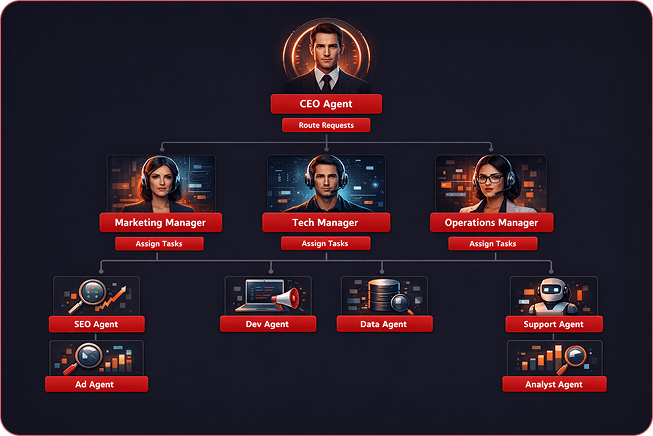
For someone who needs to automate personal workflows, the single-agent model of KimiClaw is not a weakness. It is actually simpler and more focused. But for someone running a service business who needs to simultaneously handle lead generation, outreach, proposal writing, client communication, and content production, nine agents working together is a genuinely different capability level than one agent doing everything sequentially.
Skills and Integrations: What Each Tool Can Actually Do
Both tools use a skills-based system to connect agents to real tools and real actions. But the depth and out-of-the-box availability of those skills is quite different.
KimiClaw uses ClawHub, a skill library where you search for and install the skills you need. The examples that have been tested include CSV analysis skills, scheduled digest workflows, and Telegram integration. In practice, the skill installation works and the structured workflows it enables are genuinely useful. The limitation is that you are assembling your own toolkit from the library rather than starting with a ready-made set. And some of the more advanced features like Telegram group interactions are described as still in beta and not reliably production-ready yet.
InstantlyClaw gives you fifteen skills already connected and working from the moment you deploy. Gmail, Google Docs, Google Sheets, browser control, PDF creation, web search, cron scheduling, webhooks, file manager, and lead generation tools are all active on day one. There is nothing to search for or install. Browser control in particular is the skill that powers the most compelling use cases because the agent can actually open a real browser, visit real websites, check whether they load and what they contain, and take action based on what it finds.

Skills Compared at a Glance
| Capability | KimiClaw | InstantlyClaw |
|---|---|---|
| Skills on day one | You install from ClawHub | 15 pre-wired, ready immediately |
| Real browser browsing | Available via skills | Built in, used in core workflows |
| Gmail (send real emails) | Available via skills | Pre-wired out of the box |
| Google Sheets / Docs | Available via skills | Pre-wired out of the box |
| Cron scheduling | Works reliably | Pre-wired, works reliably |
| PDF creation | Not confirmed available | Pre-wired out of the box |
| Telegram integration | Beta, inconsistent reliability | Stable, supported channel |
| WhatsApp / Discord / Slack | Not available | All supported |
| CSV and data analysis | Available via ClawHub skill | Via Analytics agent |
| File output visibility | Files saved to internal path, not easily accessible | Outputs delivered in chat or Drive |
Real Use Cases: Where Each Tool Shines and Where It Falls Short
This is the part that matters most for most people reading this. Not the feature lists, but the actual things you can do and what the experience is like when you try to do them.
Where KimiClaw Is Genuinely Good
KimiClaw is strong for personal productivity workflows that run on a schedule. If you want a briefing every morning at 7am that includes your calendar events, the latest news in your industry, and a summary of your top tasks, KimiClaw can set that up from one prompt and run it automatically every day. According to testing covered by DataCamp, the cron-style scheduling works reliably and you can create, update, and delete those scheduled tasks just by typing follow-up messages in the chat.
Multi-step research is another area where KimiClaw performs well. Ask it to research the top five open-source agent frameworks, compare their architecture, memory models, tool support, and production readiness, and return a structured report, and it handles that kind of task without needing step-by-step guidance. The Kimi K2.5 Thinking model it runs on is specifically designed for this kind of multi-constraint, multi-step reasoning work.
For individuals who want a smarter, more persistent personal assistant that handles research, information gathering, and scheduled monitoring, KimiClaw is a real option.
Where InstantlyClaw Is Genuinely Good
InstantlyClaw is built for revenue-generating workflows. The roofing contractor test I described in my full review is the clearest example of what that means in practice. One message produced a qualified lead list, a live working demo website, a formatted proposal PDF, and a personalized outreach email. The agent did that by actually opening a real browser, visiting real Google Maps listings, checking whether websites existed and loaded properly, then building and hosting an actual one-page site, creating the PDF, and writing the email. All without additional input.
That kind of end-to-end business task, going from zero to a live client-facing deliverable plus outreach, is what InstantlyClaw is designed for. And because you can tell it to run that same process every single day automatically using the cron scheduling skill, it becomes an ongoing client acquisition system rather than a one-off task.
Honest Limitations of Both Tools
Neither tool is perfect and I think being upfront about the limitations of both is more useful than pretending one of them is flawless.
KimiClaw has a few real limitations worth knowing. File outputs like charts and analysis results are saved to an internal path inside the cloud workspace that you cannot easily access from a browser. You get a file path like /root/.openclaw/workspace/filename.png rather than a link you can click or a file you can download. For workflows where you need the output in your hands, that is a real friction point. Telegram integration works for basic connections but group interactions and more complex bot behaviors are described as experimental and not reliably production-ready. And the overall monitoring and logging of scheduled tasks is limited, meaning you have limited visibility into what ran, when it ran, and whether it succeeded or failed.
InstantlyClaw's limitations are different. The base plan at $37 includes pre-loaded API access but that access has limits if you plan to run agents very hard every single day at high volume. If you are going to be aggressive with automation from day one, the DFY Niche Packs upgrade which includes twelve months of bundled API access is worth factoring in. And as with any agent that browses real websites, it will occasionally hit pages that block automated access or require a captcha it cannot pass. The agents flag these situations and ask for guidance but it does happen.
Pricing Comparison
| Factor | KimiClaw | InstantlyClaw |
|---|---|---|
| Entry cost | Requires paid Kimi subscription (Allegretto plan or above) | $37 one-time payment |
| Ongoing cost | Recurring subscription fee | No monthly fee on base plan |
| API included | Yes, runs on Kimi's own model | Yes, pre-loaded, no extra cost |
| Upgrades available | Higher Kimi subscription tiers | Optional upgrades at $67 to $297 |
| Commercial rights | Not confirmed | Included from base plan |
| Free trial / free tier | No, Claw requires paid plan | No, but $37 is a low entry point |
The pricing difference is significant depending on how you look at it. KimiClaw requires an ongoing subscription which means the cost compounds over time. InstantlyClaw is a one-time payment so once you own it, you own it. For someone who wants to use the tool for years, the math on a one-time $37 payment versus a recurring monthly subscription is very different.
Head-to-Head Ratings
Final Verdict: Which One Should You Pick
Honestly, this is not that hard of a call once you know what you are actually trying to do.
If you are an individual who wants a smart personal assistant to handle daily briefings, research digests, inbox sorting, and scheduled monitoring tasks, and you are already using or considering the Kimi platform for other things, KimiClaw is a solid option. The scheduling works reliably. The research output is structured and well-organized. The K2.5 Thinking model is genuinely good at multi-step reasoning tasks. Just go in knowing that some integrations are still in beta, file outputs are not easy to access, and there is a recurring cost tied to your subscription tier.
If you are running a service business, an agency, or any kind of freelance operation where finding clients, building deliverables, and sending outreach is part of your daily work, InstantlyClaw is the better tool and it is not particularly close. The nine-agent team structure, the fifteen pre-wired skills, the browser control that actually visits real websites, the Gmail integration that sends real emails, and the one-time price point add up to a fundamentally different value proposition for business owners.
The roofing contractor test I ran, where one message produced a lead list, a live website, a proposal, and an outreach email in minutes, is the kind of workflow KimiClaw was simply not designed to do. KimiClaw does not have a pre-built business team. It does not have browser control wired to lead generation out of the box. And it is not set up to run end-to-end client acquisition workflows autonomously on a schedule. That is not a knock on KimiClaw. It is just built for a different job.
Who Should Pick What
Two good tools. Two very different use cases. The wrong choice is just picking the one without asking what you actually need it for.
- You want a personal research and scheduling assistant
- You already pay for a Kimi plan
- Daily briefings and recurring research tasks are your main goal
- You prefer the K2.5 Thinking model for reasoning tasks
- You do not need multi-agent team structures
- You run a service business, agency, or freelance work
- You want to find clients and send outreach automatically
- You need browser control, Gmail, and PDFs out of the box
- You want a one-time price with no recurring subscription
- You want a full team structure working together from day one